這次筆記來寫寫如何從元件庫呼叫mc 到舞台上
以往的做法就是很簡單.....F11打開元件庫,從元件庫中拖曳到舞台上來
這次的做法是用語法來控制與定位然後再利用該框架來當作addChild的目標位置
首先按照以下的步驟 F11打開元件庫
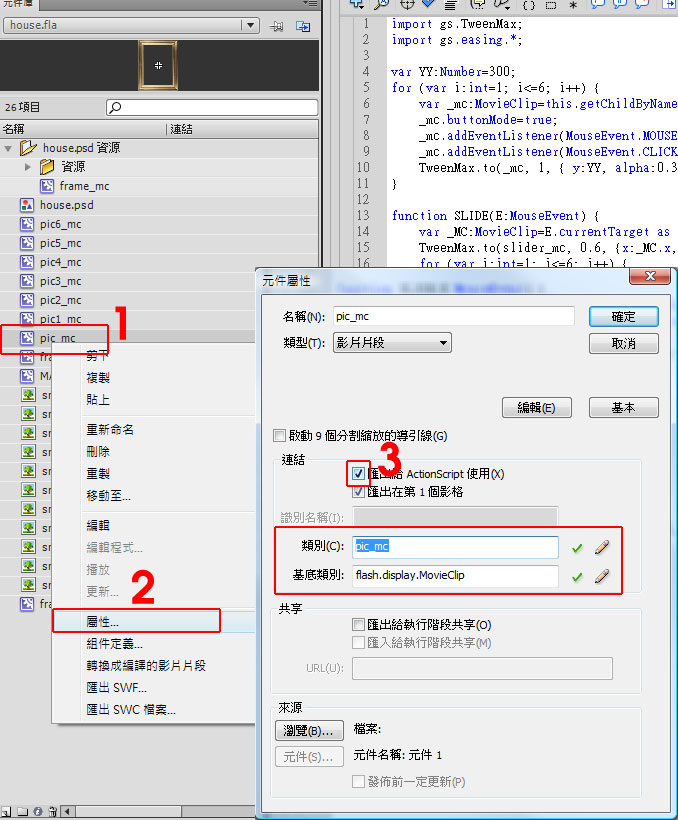
1. 對著你想要呼叫的mc 點右鍵>屬性>將匯出給actionSrcrip使用的框框打勾
這次筆記來寫寫如何從元件庫呼叫mc 到舞台上
以往的做法就是很簡單.....F11打開元件庫,從元件庫中拖曳到舞台上來
這次的做法是用語法來控制與定位然後再利用該框架來當作addChild的目標位置
首先按照以下的步驟 F11打開元件庫
1. 對著你想要呼叫的mc 點右鍵>屬性>將匯出給actionSrcrip使用的框框打勾
這幾天買了新的電腦
重灌了許多資料包含appserv
也把之前用wordpress製作的網站轉移過來
請參考 wordpress 搬家口訣 這時要登入後台時卻發生了
Cannot modify header information – headers already sent by 的問題
在製作wordpress 的外掛(plugin) 主題(theme)等等...時
難免會碰到必須中文化的時候
假如只是單純的修改.php程式碼
未來要是碰到更新的時候 全部都得重新翻譯一次
真的是很累人
// 隱藏後台控制台的widgets
function example_remove_dashboard_widgets() {
global $wp_meta_boxes;
//Main column
unset($wp_meta_boxes['dashboard']['normal']['core']['dashboard_right_now']);//現在
網頁搬家可以說是常常會碰到的事情~
簡單的動作可是只要一個不小心就有可能會搞得很麻煩....
這邊做個小筆記囉(以下為個人口訣)
Wordpress 搬家
1.備份網站(完整的將資料夾下載下來)
再製做wordpress theme的時候一定會碰到一些客製上的東西
比方說客戶要求寄信表單的所需內容物
或者某些地方想要套用自己的CSS
這時候就要用add_filter()的方式來處理囉
參數
這幾天重灌了電腦也重灌了所有的軟體
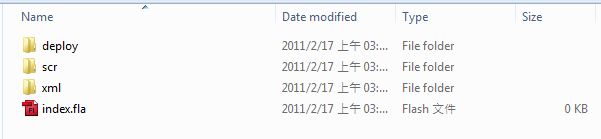
在操作Flash的時候整個被Class Path搞慘了....
雖然是很基本的問題= ="但是太久重灌電腦也都忘記了一些基本設定
這邊就快點作點筆記囉
以往只會把ActionScript寫在檔案裡面沒有這個煩惱
經過這幾天的餐會,認識了許多政商名人,看了許多大企業家努力奮鬥的精神和努力的成功
先是每個企業底下的員工以公司為榮的那種態度,
公司不惜成本培養著每位員工、重視員工
老闆帶著一個個強大的團隊接受各面像的挑戰
同時也讓我產生許多感觸與想法
這兩天測試了SyntaxHighlighter這套外掛可以把程式碼貼到部落格上
並且保留完整的屬性 WordPress、Blogger、Pixnet設定方式都不一樣先來介紹Blogger的設定方式
首先登入blogger選擇 自訂 > 修改HTML > 然後再head標籤裡面輸入以下程式碼
<link href='http://alexgorbatchev.com/pub/sh/current/styles/shCore.css' rel='stylesheet' type='text/css'/>
<link href='http://alexgorbatchev.com/pub/sh/current/styles/shThemeDefault.css' rel='stylesheet' type='text/css'/>
var _ldr:Loader=new Loader
var _req:URLRequest=new URLRequest
_req.url="AAA.swf"
_ldr.load(SWF);
_ldr.contentLoaderInfo.addEventListener(Event.COMPLETE,onLoaderComplete);